Home-service software comparison

    OptimizeIt vs Housecall Pro

    A clearer look at estimates, dispatch and customer follow-up. See where each product fits—and what to check before you switch.

    14-day free trial. No credit card required to start. Choose a plan and enter payment details to continue. No automatic charge.

    Choose Housecall Pro if…

    • Your team already relies on its scheduling and dispatch workflow.
    • You need a specific Housecall Pro payment, financing or integration option.
    • You want its AI Team and can evaluate CSR AI as an optional service.

    Choose OptimizeIt if…

    • You want trade-aware intake and editable Opti-assisted estimates.
    • You want quote, design and project workflows in the same workspace.
    • You want Lead Desk drafts to review before enabling more automation.
    • You want unlimited users on Core, Plus or Pro, with usage allowances shown separately.
    The everyday work

    Compare the workflow. Then the cost.

    Both products offer core service-business tools and AI. Feature availability, usage and optional services matter more than a simple checkmark.

    WorkflowOptimizeItHousecall Pro

    Estimates & approvals

    OptimizeItManual estimates and Opti-assisted drafts from supported photos, plans and job details. Review scope and prices before sending.
    Housecall ProDigital estimates, customer approvals and signatures. Advanced proposals and change-order availability depend on the selected plan.

    Scheduling & booking

    OptimizeItCalendar, crew assignments and project booking/reschedule controls; booking rules require setup.
    Housecall ProScheduling, dispatch and online booking, with bookings added to the team calendar.

    Invoices & payments

    OptimizeItInvoices, deposits and remaining balances; collection requires connected business payment setup.
    Housecall ProDigital invoicing, payment reminders and payment options; processing and financing terms apply.

    Customer experience

    OptimizeItSupported customer portals, estimate approvals and project/payment access.
    Housecall ProOnline booking, digital estimate approvals and customer payment experiences. Confirm the exact portal features you need.

    AI phone answering

    OptimizeItAI Voice Agent access on Pro; setup, routing and agent-minute allowances apply.
    Housecall ProCSR AI is an optional add-on for 24/7 answering. Confirm live booking capabilities, rollout eligibility and current terms.

    Other AI tools

    OptimizeItOpti estimate assistance, supported design/plan tools and Lead Desk drafts; tools and credits vary by plan.
    Housecall ProHousecall Pro describes other AI Team members as included with an account; CSR AI is separate. Check individual availability.

    Team & billing

    OptimizeItStarter: one user. Core, Plus and Pro: unlimited users. Published plans; software access and usage allowances are listed separately.
    Housecall ProBasic, Essentials and MAX have different user limits. Compare monthly/annual totals, additional users and optional services.
    Compare your actual configuration. Basic, Essentials and MAX; compare current user limits, billing cadence and optional services on Housecall Pro’s pricing page. Promotions, renewal prices and add-ons can change. Check the official sources below.
    Inside OptimizeIt

    Real screens. Connected work.

    Actual OptimizeIt demonstration accounts—not mockups or competitor screens.

    Review the estimate before sending.

    Check customer details, editable line items and the customer preview in the same estimate workspace.
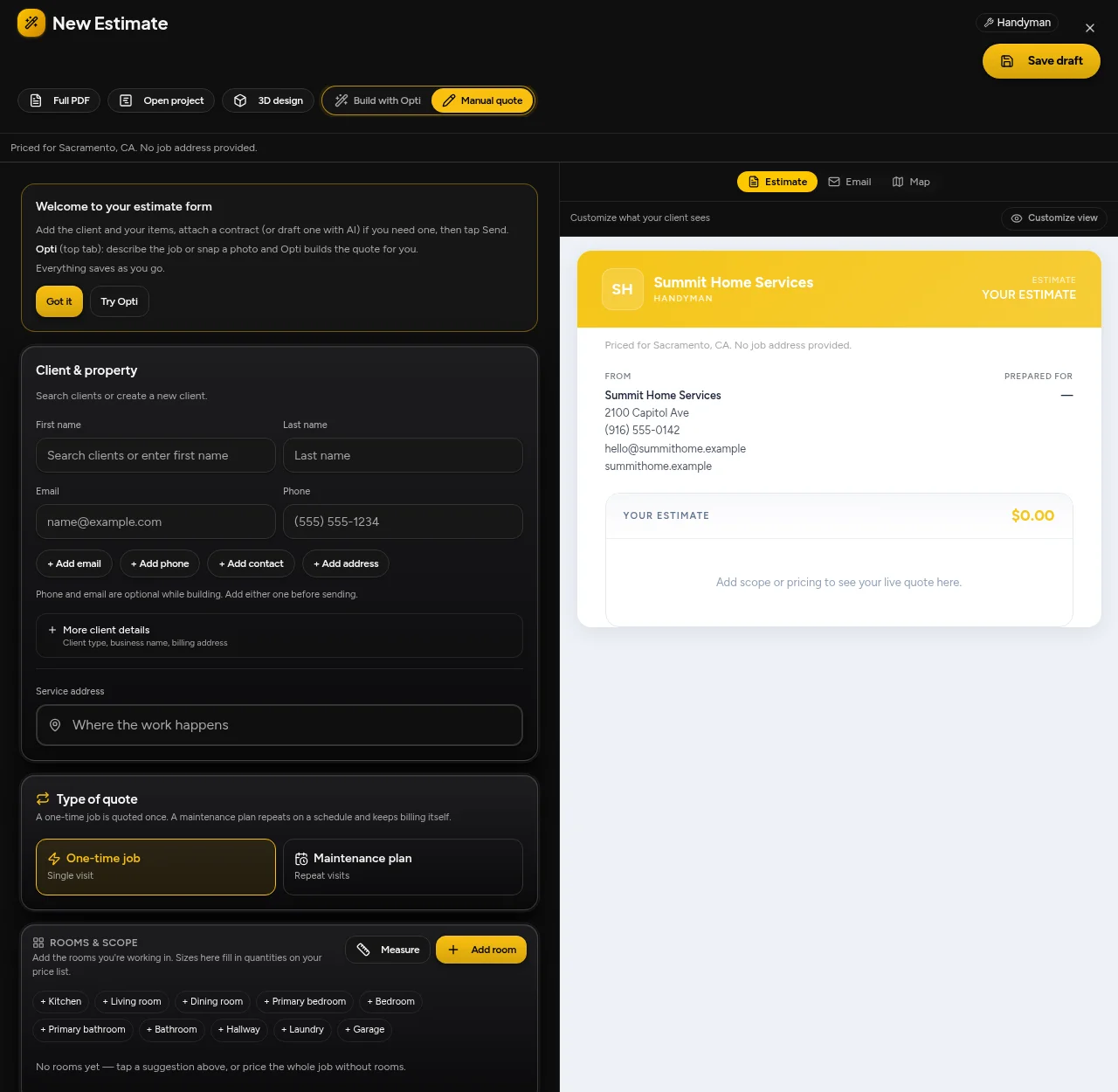
    OptimizeIt · estimate editor and customer preview
    OptimizeIt · estimate editor and customer preview · Demonstration account

    Keep signed work moving.

    Review projects and the next booking or scheduling action without rebuilding the customer record.
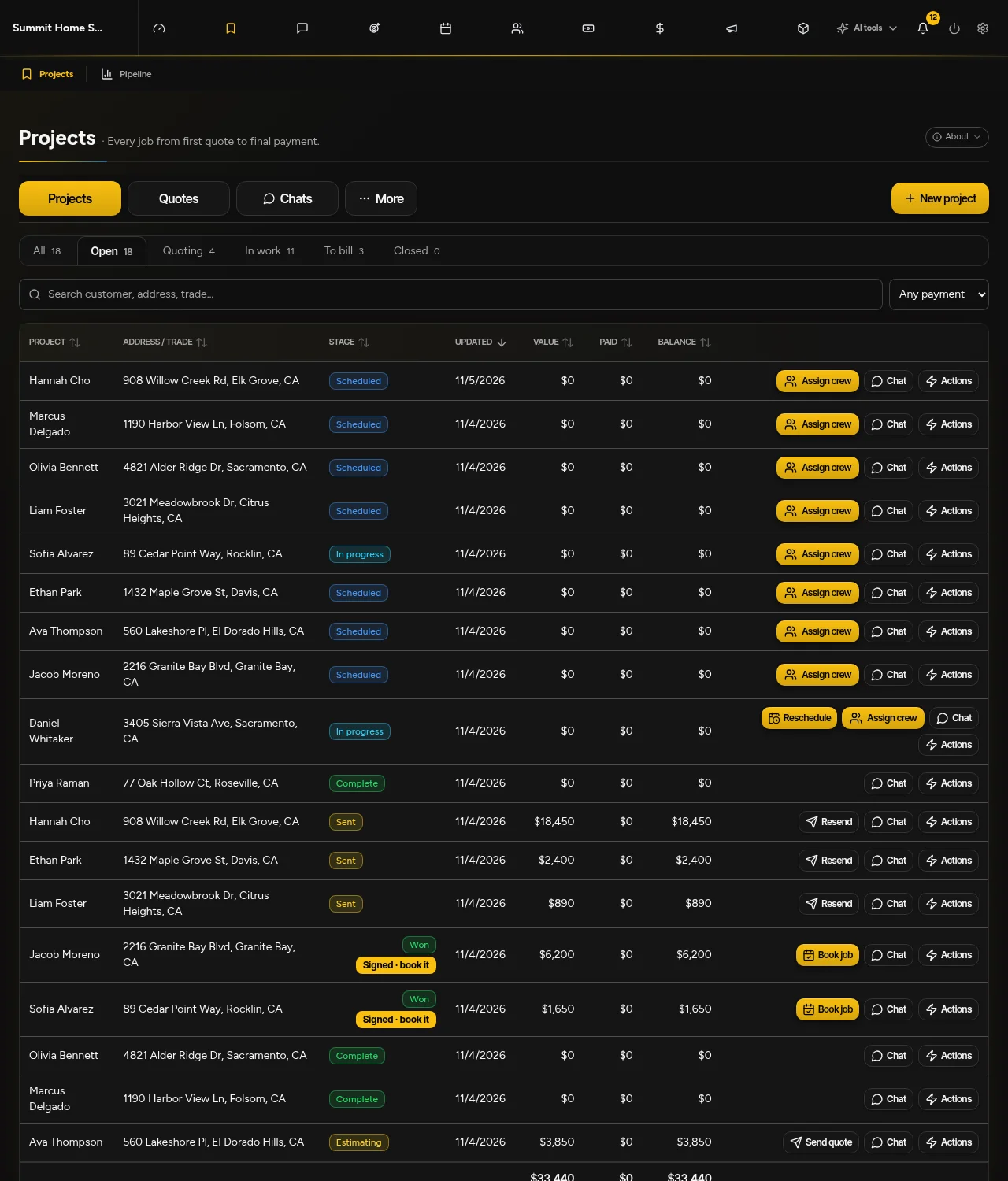
    OptimizeIt · projects, signed quotes, booking and rescheduling
    OptimizeIt · projects, signed quotes, booking and rescheduling · Demonstration account
    Why consider OptimizeIt?

    Less starting over. More moving forward.

    Start with the job evidence

    Opti helps organize supported photos, plans and job descriptions into editable estimate scope. You review uncertain quantities and pricing.

    Keep the next action close

    Quotes, signatures, booking and rescheduling remain connected to projects. Signing a quote is not automatically a booking or a payment.

    Choose how Opti follows up

    Lead Desk starts with Drafts only. Instant replies and eligible callbacks are optional, with channel, consent and plan requirements.

    Test a representative job, check the connections you need and confirm your data-import scope. Do not cancel your current software until the replacement workflow is verified.

    Good questions

    Know before you start.

    Does Housecall Pro include AI?

    Yes. Housecall Pro describes an AI Team and distinguishes included AI teammates from CSR AI, its optional phone-answering add-on. Official marketing and help material differ on some booking details, so confirm the capabilities live in your account rather than assuming every advertised action is available.

    Does OptimizeIt include an AI Voice Agent on every plan?

    No. Pro includes AI Voice Agent access. Plus includes the phone system without the AI agent. Agent minutes are separate from ordinary phone minutes; check current plan allowances and routing settings.

    Can I move my existing customer data?

    Discuss your available exports and required records with our team before switching. Confirm the import scope, custom fields and integrations, and check a sample before cancelling your existing system. We do not promise every record or integration transfers automatically.

    What happens after the free trial?

    14-day free trial. No credit card required to start. Saved work becomes view-only after an unpaid trial expires. Choose a plan and enter payment details to continue. No automatic charge.

    Is annual billing required?

    No. Month-to-month has no annual commitment. Annual options have a 12-month commitment, billed monthly or paid up front. Compare full totals and signed terms on the pricing page.

    Check the details

    Official sources, not assumptions.

    Official material reviewed November 5, 2026. We publish this comparison as OptimizeIt, not an independent review site. Exact competitor prices are not quoted because selected team sizes, promotions and add-ons change the total.

    OptimizeIt plans and usage allowances

    Try it with your next job.

    14-day free trial. No credit card required to start.

    Start Your 14-Day Free Trial